
Skip to content
LiftIQ
Live on the App Store
LiftIQ: AI Rep Counter

Train with confidence. Let the camera count.

LiftIQ uses your iPhone camera and on-device pose analysis to count reps, surface real-time form cues, and save workout progress without an account or video uploads.

Published on the App Store under RAPHAEL MOMANYI. Last reviewed for portfolio context on May 23, 2026.

Portfolio context

Primary action is the verified App Store listing, not a purchase-disclosure funnel.

Support, privacy, and terms pages are app-specific and linked from this page.

Guide pages are written as fit guidance with source links and conservative claims.

Navigate LiftIQ

Move between the main app page, support, features, and legal pages without backing out to the main directory.

Browse all apps
Workflow fit

What LiftIQ is built to help with

LiftIQ is a private iPhone workout companion for camera-based rep counting and form feedback. Choose an exercise, position your full body in frame, follow live cues, and review locally stored reps, sets, form trends, and workout history.

Best for

strength traineeshome workout usersform-focused lifters

Workflow tags

camera rep countingexercise form cuesworkout historylocal progress

Product visuals

LiftIQ screenshots

1 mapped asset

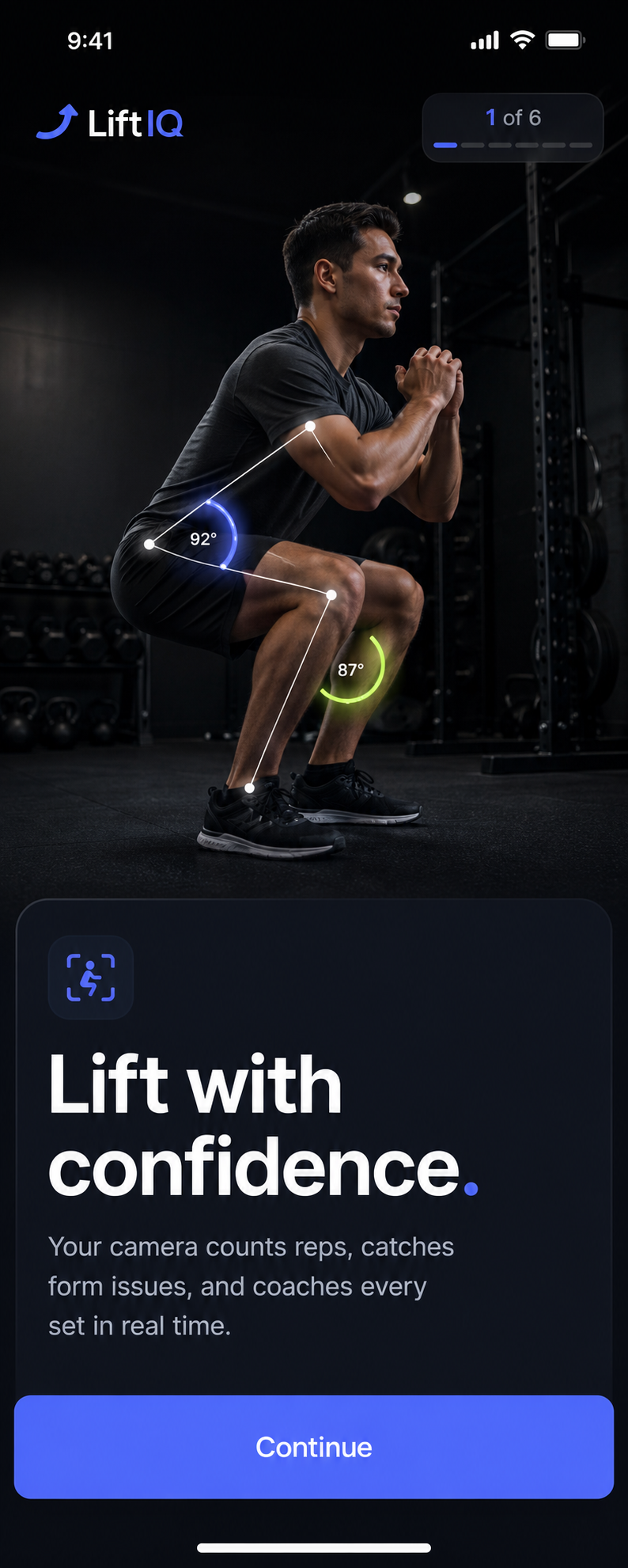
LiftIQ onboarding screen showing camera-based squat rep counting and form coaching
Developer-provided asset
Features

Evaluate the core product surface

These are portfolio-level feature summaries. Use the live App Store listing and the app itself to confirm the current feature set before adopting it into a recurring workflow.

Feature page

Live rep counting

Use the iPhone camera to count completed reps while you focus on the movement.

Real-time form cues

Receive concise visual and spoken guidance when supported movements drift from their expected form.

20-exercise library

Train across lower body, upper body, core, and conditioning movements with exercise-specific setup guidance.

Guided workout flow

Move through camera setup, active sets, rest timers, pauses, and a clear workout summary.

Private progress history

Review local workout history, rep performance, form trends, and consistency charts on your device.

On-device by design

Camera frames are analyzed on your iPhone; LiftIQ does not require an account or upload workout videos to an app server.

What to verify

Confirm exports, permissions, platform requirements, and any workflow limits inside the current App Store listing and app build.

Privacy and support

Review the app-specific privacy, terms, and support pages before using the app for sensitive records.

Related hubs

Guides

All LiftIQ marketing guides

Every indexable guide and comparison page for this app stays linked from the product page so search visitors can move between app fit, support, and alternatives.

guide

AI Rep Counter App for iPhone

A focused guide to LiftIQ as an iPhone app for ai rep counter workflows.

Open page

guide

AI Rep Counter App for Mobile Workflows

How LiftIQ supports mobile-first work where the user needs a focused app instead of a broad platform.

Open page

guide

LiftIQ Feature Guide

A source-backed feature guide for LiftIQ, based on the live App Store listing and portfolio product data.

Open page

guide

LiftIQ Setup and Support Guide

Where to start with LiftIQ, what to check first, and where to find app-specific support routes.

Open page

guide

LiftIQ Privacy and Data Handling Guide

A conservative overview of how to evaluate privacy, local data, exports, and support pages for LiftIQ.

Open page

guide

AI Rep Counter App for wellness & insight

How LiftIQ fits the wellness & insight part of the iOS Builder app portfolio.

Open page

guide

AI Rep Counter App with Live rep counting

A page focused on live rep counting inside LiftIQ and why that capability matters for the app workflow.

Open page

guide

AI Rep Counter App with Real-time form cues

A page focused on real-time form cues inside LiftIQ, using the live app listing as the source anchor.

Open page

guide

AI Rep Counter App with 20-exercise library

A page focused on 20-exercise library inside LiftIQ for users comparing workflow fit.

Open page

guide

LiftIQ App Store Listing Guide

A quick guide to the live LiftIQ App Store listing, support page, privacy page, and terms route.

Open page

guide

AI Workout Rep Counter for iPhone

How to evaluate an iPhone workout rep counter when camera setup, movement support, immediate feedback, and privacy matter.

Open page

guide

Camera Form Coach for Home Workouts

What to look for in a camera-based exercise form coach, from full-body framing and real-time cues to honest analysis limits.

Open page

guide

On-Device Workout Tracker

Why local workout history and on-device camera analysis can matter for people who do not want an account-based fitness platform.

Open page

guide

Bodyweight Rep Counter App

A practical guide to choosing a bodyweight rep counter for squats, push-ups, lunges, planks, conditioning, and other at-home movements.

Open page

Frequently asked questions about LiftIQ

No. LiftIQ has no sign-in or app account. Core workout records and preferences are stored locally on your device.
No. Live camera frames are analyzed on-device for pose and movement signals. LiftIQ does not save those frames as workout videos or upload them to an app server.
LiftIQ includes 20 bodyweight and strength movements across lower body, upper body, core, and conditioning. Some movements provide rep counting plus form feedback, while calf raises are intentionally rep-count only.
Eligible new customers can receive 3 days of introductory access with the once-per-year purchase option. Apple determines eligibility and shows the exact localized offer before purchase; the once-per-month option begins with purchase-based access.
No. LiftIQ is a fitness tracking and feedback tool. It cannot assess your health, guarantee technique, prevent injury, or replace qualified coaching or medical advice.
Workout analysis and history are designed to work on-device. Internet access can still be required for App Store purchase, restore, and purchase-management services.
Related apps

More focused apps in nearby workflows

Live on the App Store
AirLog

AirLog

CPAP Progress You Can Actually See

AirLog is a privacy-first CPAP companion for people who want a simple morning routine, better equipment tracking, and cleaner history before sleep appointments. Check-ins, journal notes, mask comparisons, and reports are designed to stay organized on your device.

CPAP check-insEquipment remindersDoctor-ready reports
Live on the App Store
Anchor

Anchor

Private Recovery Companion

Anchor is a native iPhone recovery and habit-support app for people reducing, quitting, or maintaining sobriety. It keeps core recovery data local, does not require an app account, reads HealthKit signals only with permission, and helps users move through cravings with fast interventions, journaling, slip logs, crisis resources, and private exports.

No accountHealthKitCraving supportLocal-first
Live on the App Store
Birdie AI

Birdie AI

Personal Golf Coach

Birdie AI is a native iPhone golf improvement coach for players who want practical progress without tour-level dashboards. Log scores, putts, fairways, greens, penalties, and notes, then see whether driving, approach, short game, putting, penalties, or course decisions are costing you the most strokes.

Golf coachRound statsVoice loggingPractice options